| Name |


|
SAVE STATES:
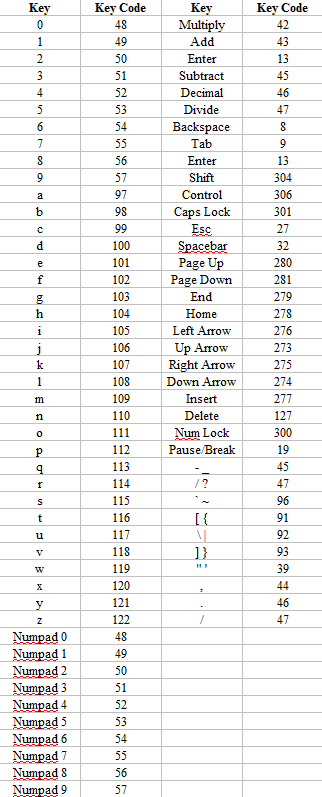
Emulators for which I use save states: &  are hard-coded in PCSX2 for one of its plugins (see the ini file in PCSX2). This should not eliminate these keys from consideration because you should not be using that emulator's save states. are hard-coded in PCSX2 for one of its plugins (see the ini file in PCSX2). This should not eliminate these keys from consideration because you should not be using that emulator's save states.
 through through  are off-limits for the save/load buttons because MAME will also count save/load command button as the save slot. are off-limits for the save/load buttons because MAME will also count save/load command button as the save slot.
So the save/load buttons (but not the slot selection buttons) need to be non-alpha-numeric. The best bet is probably a F[1-12] button. This means that KeyWiz is a poor choice for KB encoder for Linux, since it has no default F[1-12] ports, and you cannot reconfigure KeyWiz in Linux. Also, AHK does not work with MAME, so you would have to maintain seperate Linux and Windows configs if using KeyWiz (and even then, I don't know if xmodkeys works with MAME). So just use F[1-12] keys. & are hard-coded in Fusion for save and load. So let's try using these.
& should work as the save selection buttons. In MAME, these are the coin buttons, and adding a coin as you select the state will not be a big deal. For consoles, these were planned to be used as the "select" buttons, but the "select" button is virtually unused, and for those games which do use it, I now map "select" to one of the game-play buttons on a per-game basis, as needed.
WINE: Linked /NoQuarter to ~/.wine/drive_c so paths passed to WINE can use C: instead of Z: |
System/Games |
|
MAME
Linux native |
 (hold)

 ::
::


|
2026 crap:
BGFX, HLSL, and GLSL on Reddit /NoQuarter/emulators/mame-linux/mame -skip_gameinfo <rom> c:\NoQuarter\emulators\mame-windows/mame.exe -skip_gameinfo <rom> First run: mame -cc Showed up in "Toggle Debugger" and "Toggle Post-Processing". Clear these bindings.
Is supposed to be "Decrease frame skip", but it wasn't set. Check and clear this binding if necessary.
|
|
|
UXME
Linux native |
/NoQuarter/emulators/uxme-0.171-4/uxme.linux -skip_gameinfo <romspath>/<rom> Defender 8-way patch. |
|
|
|
Flycast
Linux native |
/NoQuarter/emulators/flycast-linux/flycast
|
|
|
|
Dolphin - Triforce
Linux native |

|
/NoQuarter/emulators/dolphin-linux/Dolphin_Emulator-2603a-anylinux-x86_64.AppImage -b -e <romspath>/<rom> Old emulator: Create the empty file portable.txt to force use of portable configuration. Use AHK file to send F1 to load th MK GP save state. |
|
|
Supermodel
|
|
/NoQuarter/emulators/supermodel-linux/supermodel -fullscreen <romspath>/<rom> |
|
| TeknoParrot |
|
||
|
Zinc
WINE Tentatively replaced with current MAME 2026 |
[END]


|
deprecated. mame can handle these now
|
|
|
MAMEPP
WINE |
Runs Cotton Boomerang at a better speed than my main MAME. But I'm using Cotton 2, which is fine with my regular MAME version. |
|
|
|
Demul (Naomi)
WINE |


 ++
--
++
--


|
Config => GamePad => Global/hot keys
Quick Start Full Guide demul -run=naomi (even for naomi 2 games) Need AHK to send Alt+Enter and a screen kill command to exit with the Escape key.
|
|
| FBA |
|
Input for each game must be done individually in the GUI.
Also map 'p' to pause for each game... ...so an AHK file is no longer necessary for every FBA game. Replaced with MAME |
|
| CPS3 |
Tentatively replaced by MAME Need to double-check Warzard and SFIII3 will work OK. .\shots .\cfg
|
|
|
| Kawaks | Unused alternative for CPS1/2 and NeoGeo. Using FBA for these games. | ||
| Model 2 Sega |
|
|
|
| Nebula |
|
|
|
Stella
Linux native |
|
stella <romspath>/<rom>
|
|
|
FS-UAE Linux native |
...
...
|
ln -s /NoQuarter/emulators/fs-uae-linux/FS-UAE home/sean/Documents "F12" is the emulator menu. This is where you do can everything: load, save, exit, etc... The joystick buttons are RAlt and RCtrl. These cannot be remapped. I believe the developer used these because he wants the rest of your KB to be used as the virtual Amiga's KB, and the Amiga probably didn't have a RAlt and RCtrl. AHK also is not reliable with this emulator. The emulator does support gamepads, so when I get that working, there won't be a mapping issue for the cabinet. I am using the "data1" field in my DB for the second disc image, when it is required. I am using the "data2" field for the rom version. Use 3.1 for the later model Amiga "AGA" and CD32. For everything else, you probably want 1.3 One drive, one disc:
/NoQuarter/emulators/fs-uae-linux/Linux/x86-64/fs-uae --kickstart_file=/NoQuarter/emulators/fs-uae-linux/bios/kickstart-<data2>.rom
/NoQuarter/emulators/fs-uae-linux/Linux/x86-64/fs-uae --kickstart_file=/NoQuarter/emulators/fs-uae-linux/bios/kickstart-<data2>.rom
/NoQuarter/emulators/fs-uae-linux/Linux/x86-64/fs-uae --kickstart_file=/NoQuarter/emulators/fs-uae-linux/bios/kickstart-<data2>.rom
OLD:
fs-uae ~/Documents/FS-UAE/Configurations/<game>.fs-uae --fullscreen=1 --load_state=1 --keep_aspect=1 Linux
~/Documents/FS-UAE
Following the above procedure is not enough to get Overkill running from scratch. I can't get it past the crack team intro. However I did it before, I have the save state for once it's past the crack team intro, so it works when you load it with the save state, but I don't know how to recreate the save state. |
|
|
Neko Project II W
Windows/Wine |
Exit:
PC-98 Bot. Probably the best place to start, but focused on NP2/W. Some LaunchBox-based info from 2016 Quick np21nt setup, in case it helps with the version I'll be using Reddit 2024, some folks recommending NP2/W, in general. Whereas I'm currently leaning towards NP2/K (Kai). |
||
|
T98 Next
Wine (platinum) |

 ,
,


 ...
,
,
...
,
,

|
||
| Nestopia |

|
.\screenshots
|
|
|
BigPEmu
Linux native |
Online Manual |
|
|||||||||||||
|
Ares (tg16)
Linux native |
Ares, generalSettings -> Shader -> "edge-smoothing" -> xbrz -> 4xbrz-linear (also tried scalefx, but did not see a difference)
Ares has only one global key mapping. In the "Input" menu, there is a drop-down for all controllers for all emulatated systems.
NEC/TG-16/SG-16Reddit Bios infocd /NoQuarter/emulators/ares-linux/hbcontrols cp _basesettings.bml settings.bml sed -i -e '/PLAYER1/{r <data1>' -e 'd}' settings.bml sed -i -e '/PLAYER2/{r <data2>' -e 'd}' settings.bml cp settings.bml ../dotconfigfolder /NoQuarter/emulators/ares-linux/ares-v147-anylinux-x86_64.AppImage --fullscreen --system "PC Engine" <romspath>/<gamefolder>/<rom> cd /NoQuarter/emulators/ares-linux/hbcontrols cp _basesettings.bml settings.bml sed -i -e '/PLAYER1/{r <data1>' -e 'd}' settings.bml sed -i -e '/PLAYER2/{r <data2>' -e 'd}' settings.bml cp settings.bml ../dotconfigfolder /NoQuarter/emulators/ares-linux/ares-v147-anylinux-x86_64.AppImage --fullscreen --system "PC Engine CD" <romspath>/<gamefolder>/<rom> cd /NoQuarter/emulators/ares-linux/hbcontrols cp _basesettings.bml settings.bml sed -i -e '/PLAYER1/{r <data1>' -e 'd}' settings.bml sed -i -e '/PLAYER2/{r <data2>' -e 'd}' settings.bml cp settings.bml ../dotconfigfolder /NoQuarter/emulators/ares-linux/ares-v147-anylinux-x86_64.AppImage --fullscreen --system "SuperGrafx" <romspath>/<gamefolder>/<rom> cd /NoQuarter/emulators/ares-linux/hbcontrols cp _basesettings.bml settings.bml sed -i -e '/PLAYER1/{r <data1>' -e 'd}' settings.bml sed -i -e '/PLAYER2/{r <data2>' -e 'd}' settings.bml cp settings.bml ../dotconfigfolder /NoQuarter/emulators/ares-linux/ares-v147-anylinux-x86_64.AppImage --fullscreen --system "SuperGrafx CD" <romspath>/<gamefolder>/<rom>
|
|
|||||||||||||
|
Ares (snes)
Linux native |
cd /NoQuarter/emulators/ares-linux/hbcontrols cp _basesettings.bml settings.bml sed -i -e '/PLAYER1/{r <data1>' -e 'd}' settings.bml sed -i -e '/PLAYER2/{r <data2>' -e 'd}' settings.bml cp settings.bml ../dotconfigfolder /NoQuarter/emulators/ares-linux/ares-v147-anylinux-x86_64.AppImage --fullscreen --system "Super Famicom" <romspath>/<rom> |
|
|||||||||||||
|
Ares (genesis)
Linux native |
cd /NoQuarter/emulators/ares-linux/hbcontrols cp _basesettings.bml settings.bml sed -i -e '/PLAYER1/{r <data1>' -e 'd}' settings.bml sed -i -e '/PLAYER2/{r <data2>' -e 'd}' settings.bml cp settings.bml ../dotconfigfolder /NoQuarter/emulators/ares-linux/ares-v147-anylinux-x86_64.AppImage --fullscreen --system "Mega Drive" <romspath>/<rom> |
|
|||||||||||||
|
MESS
Linux native |
(hold)
::
|
/NoQuarter/emulators/mame-177/mess64.linux -skip_gameinfo genesis -cart <rom>
MESS Systems MESS command line options System status |
|
Virtual Jaguar |
~/.config/Underground Software Visual control mapping. |
|
|||||||||
|
Retroarch - TG16
Linux native |
|
||||||||||||||
|
Mednafen
Linux native |
::
++
--
|
mednafen -fs 1 <rom>
~/.mednafen ~/.mednafen/mednafen-09x.cfg
Per-game config. Place in pgconfig/<base rom name>.pce|psx.cfg No native pause function, but it can be implemented by alternating between Alt-A (advance frame) and Alt-R (resume) Functions are supposedly remappable by pressing F2 in-game, and then you hit the deafult/current key for the function you want remapped, then hit the key it should be remapped to twice (the second stroke tells the F2 function you are done remapping) Hotkeys can also be remapped in mednafen-common\mednafen-09x.cfg When making config changes, do it for the current config in mednafen-common, and also do it in the cfg file under inputmapping\keyboard|joypad|etc\mednafen
Alt+Shift+n = remap controller n
Emulator resolution needs to match desktop resolution? |
|
||||||||||||
|
Fusion
Linux native |
 ++
--
++
--
|
kega-fusion -fullscreen <rom>
~/.Kega Fusion
Windows version is at 3.64. Linux version is at 3.63 The windows version will exit on Escape key if started in full screen mode. The Linux version only ever toggles between full-screen and windowed mode with the Escape key. Need to exit the Linux version with Alt-F4. Forced sequential control mapping. Does not mix KB and JS
Make sure full screen ratio matches your monitor ratio:
Single key substitutions:
One-to-Multiple key substitutions: (in .xbindkeysrc) |
|
||||||||||||
|
Higan
Linux native |
higan -fullscreen <rom>
~/.local/share/higan
Games need to be imported into the Higan library.
Some versions don't respect -fullscreen, or don't do full screen correctly. Other versions have some other unremembered problem, possibly to do with input remapping/AHK
The most accurate SNES emulator, but not recommended for non-SNES hardware. |
|
|||||||||||||
|
ZSNES
Linux native |


|
Single key substitutions: |
|
|
Mupen
Linux native |
|
mupen64plus 2.0 for XP 322.5 for 7 64 No GUI - need to edit cfg files. Which also means it won't run without a rom. Save slots are hard-coded to 1-9, so I use AHK to remap P1 and P2 start buttons to "i" and "o" /usr/share/games/InputAutoCfg.ini c:\noquarter\emulators\mupen64plus-2.x\InputAutoCfg.ini
/home/sean/.config/mupen64plus/mupen64plus.cfg
|
|
|
Ymir
Linux native |
/NoQuarter/emulators/ymir-linux/ymir-sdl3 -f -d <romspath>/<gamefolder>/<rom> |
|
|
|
Duckstation
Linux native |
I think if you have multiple keys mapped to a virtual gamepad button, either none will work, or only one will work. |
cd /NoQuarter/emulators/duckstation-linux/hbcontrols cp _basesettings.ini settings.ini sed -i -e '/PLAYER1/{r <data1>' -e 'd}' settings.ini cp settings.ini .. /NoQuarter/emulators/duckstation-linux/DuckStation-x64.AppImage "<romspath>/<gamefolder>/<rom>" -batch -fullscreen |
|
| SSF |
|
|
|
| Project64 |
|
|
|
|
ePSXe
Linux native |
(toggle)
|
|
|
|
PCSX2
Linux native |
|
PCSX2 <rom> ~/.config/PCSX2 Remap hotkeys in PCSX2_keys.ini Visual control mapping. Supports mixed input. No 64-bit build. |
|
|
Flycast - Dreamcast
Linux native |
|
||
|
Dolphin
Linux native |
|
Recommended 2 * 3.0 GHz processor and/or newer than 2008. Recommended graphics card supporting D3D 11 / OpenGL 4.4 (minimum D3d 10 / OpenGL 3.0) dolphin-emu-nogui -e /NoQuarter/roms/gamecube/<rom>
~/.cache/dolphin-emu
Create the empty file portable.txt to force use of portable configuration. 2019 Xubuntu 18.04: Dolphin does not respect the "portable.txt" flag file. Using the "-u" option on the command line to point it to Noquarter's Dolphin config folder. Windows Dolphin understands the forward slash as a separator in paths, making it easier to share the same config files between Windows and Linux. When installing to a new Linux machine:
There is no longer a full screen flag on the command line. |
|
|
Demul
WINE |
++
--
|
Config => GamePad => Global/hot keys
Quick Start Full Guide For the older versions necessary for XP, which do not support (or fail at) specifying the rom name on the command line, you need one of the following files to contain the path to the image, depending on your image plug-in:
One guy couldn't get SFRush 2049 USA version working, but PAL version worked. Everything else has playable-level compatibility without any config edits. |
|
| NullDC |
|
Dreamcast disc images:
|
|
|
Reicast
Linux native |
|
~/.config/reicast/emu.cfg
~/.local/share/reicast/data
~/.local/share/reicast/
/usr/local/share/reicast/mappings/
reicast-joyconfig -f <file name>
evtest
|
|
|
RCPS3
Linux native |
/NoQuarter/emulators/rpcs3-linux/rpcs3-v0.0.40-19058-2ba7756c_linux64.AppImage --no-gui --fullscreen <romspath>/<gamefolder>/<rom> /NoQuarter/emulators/rpcs3-linux/rpcs3-v0.0.40-19058-2ba7756c_linux64.AppImage --no-gui --fullscreen <romspath>/<gamefolder>/<rom>
|
|
|
Xenia
Linux native |
|
|
|
VBA-M
Linux native |
/NoQuarter/emulators/vbam-linux/visualboyadvance-m -f <romspath>/<rom> |
|
|
|
VBA-M
Linux native |
/NoQuarter/emulators/vbam-linux/visualboyadvance-m -f <romspath>/<rom> |
|
|
|
MelonDS
Linux native |
|
||
|
PPSSPP
Linux native |
|
ppsspp --fullscreen <rom> ~/.config/ppsspp Might want to open the config file and set save file encryption to false. It's only for if you want to copy save files to a real device. Some downloaded saves might not be compatible with it.
config is under .\memstick
Cropping screenshots to 360 * 520 works well, and then resize of course in NQ. Cropping screenshots to 450 * 650 works well, and then resize of course in NQ. Supports mixed input |
|
|
Desmume X432
WINE |

|
wine DeSmuME_X432R_x64.exe C:\\NoQuarter\\roms\\nintendods\\<rom> /NoQuarter/emulators/desmumeX432R/DeSmuME_X432R_x<arch>.ini configuration
Window Size = the whole app window Screen Size: Ratio of screen 1 to screen 2. IOW how the two screens divide up the window size. Stock Desmume allows you to choose window size, but the screen 1 to screen 2 ratio is always 1:1 Config => 3D Settings => Renderer This is where you can choose one of the high internal resolution options, whether of the Softrasterizer or OpenGL variety. Unfortunately, the high-res choices crash in WINE. At least if you set it to non-high-res OpenGL, you can set AA and Alpha Blending, which does not appear to be present in stock Desmume. Readme FAQ Command Line Run the emulator w/ or w/o game and config controllers. Use Alt+Enter to toggle full screen. The config file will remember if you were full screen or windowed. |
|
|
Desmume
Linux native |
 ::
::
|
.\screenshots
Readme FAQ Command Line run emu w/ or w/o game and config controllers |
|
|
mGBA
Linux native |


|
mgba-qt -f <rom> ~/.config/mgba
mgba has no menu to config controls, or anything else. Editing the config file manually under "SDL" had no effect, and the defaults were automatically put back in anyway after two or three games.
~/.config/mgba |
|
|
Visual Boy Advanced
Linux native |
|
Visual control mapping. |
|
|
Windows Games
WINE |
|
export WINEPREFIX=/home/sean/winegames/<data1> cd /home/sean/winegames/<data1>/drive_c/<subfolder> wine start <data2>
Cho-ren-sha 68k:
Guilty Gear XX ACP: Mortal Kombat 9 (Komplete): All menu functionality is keyboard hard-coded defaults. Only character control can be remapped. Skip intro movies: C:\Program Files (x86)\Mortal Kombat Complete Edition\DiscContentPC\Movies remove:
Super Fightin' Spirit:
Double Dragon Reloaded |
|
|
Windows Emulators
WINE |
|
||